
Listen free IoT (internet of things) classes
https://youtube.com/playlist?
Subscribe for more videos
UNIT - 1
Problem solving techniques in C
- Formulate simple algorithms for arithmetic and logical problems
- Translate the algorithms to programs (in C language)
- Test and execute the programs and correct syntax and logical errors
- Implement conditional branching, iteration and recursion
- Decompose a problem into functions and synthesize a complete program using divide and conquer approach
- Use arrays, pointers and structures to formulate algorithms and programs
- Apply programming to solve matrix addition and multiplication problems and searching and sorting problems
- Apply programming to solve simple numerical method problems, namely rot finding of function, differentiation of function and simple integration
What is an Algorithm? Algorithm Basics
The word Algorithm means ” A set of finite rules or instructions to be followed in calculations or other problem-solving operations ” Or ” A procedure for solving a mathematical problem in a finite number of steps that frequently involves recursive operations”.
Therefore Algorithm refers to a sequence of finite steps to solve a particular problem.
Algorithms can be simple and complex depending on what you want to achieve
It can be understood by taking the example of cooking a new recipe. To cook a new recipe, one reads the instructions and steps and executes them one by one, in the given sequence. The result thus obtained is the new dish cooked perfectly. Every time you use your phone, computer, laptop, or calculator you are using Algorithms. Similarly, algorithms help to do a task in programming to get the expected output.
The Algorithm designed are language-independent, i.e. they are just plain instructions that can be implemented in any language, and yet the output will be the same, as expected.
What are the Characteristics of an Algorithm?
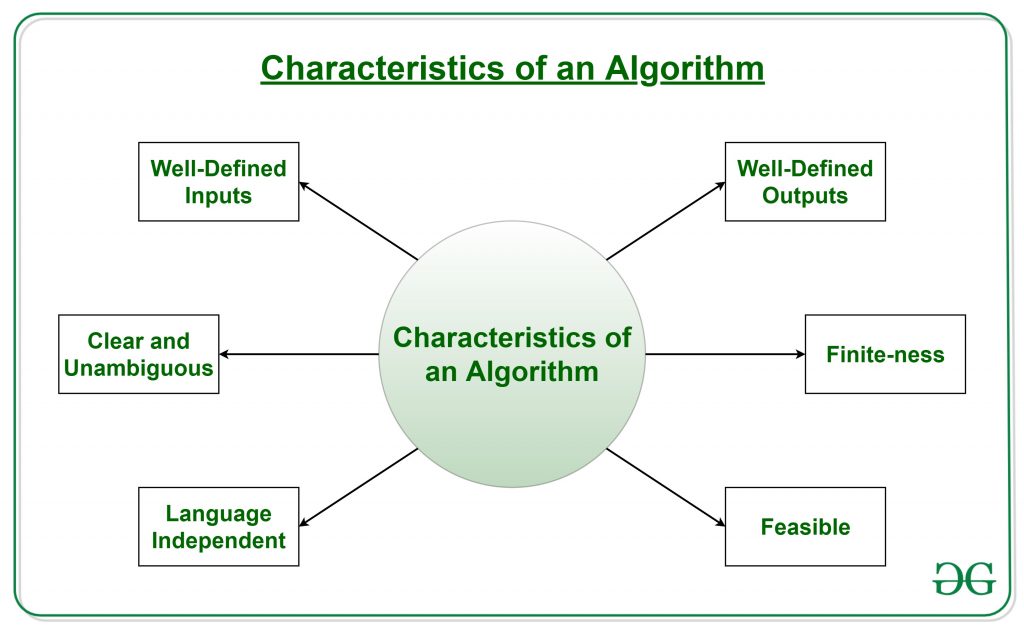
As one would not follow any written instructions to cook the recipe, but only the standard one. Similarly, not all written instructions for programming is an algorithms. In order for some instructions to be an algorithm, it must have the following characteristics:
- Clear and Unambiguous: The algorithm should be clear and unambiguous. Each of its steps should be clear in all aspects and must lead to only one meaning.
- Well-Defined Inputs: If an algorithm says to take inputs, it should be well-defined inputs. It may or may not take input.
- Well-Defined Outputs: The algorithm must clearly define what output will be yielded and it should be well-defined as well. It should take at least 1 output.
- Finite-ness: The algorithm must be finite, i.e. it should terminate after a finite time.
- Feasible: The algorithm must be simple, generic, and practical, such that it can be executed with the available resources. It must not contain some future technology or anything.
- Language Independent: The Algorithm designed must be language-independent, i.e. it must be just plain instructions that can be implemented in any language, and yet the output will be the same, as expected.
Properties of Algorithm:
- It should terminate after a finite time.
- It should produce at least one output.
- It should take zero or more input.
- It should be deterministic means giving the same output for the same input case.
- Every step in the algorithm must be effective i.e. every step should do some work.
Types of Algorithms:
There are several types of algorithms available. Some important algorithms are:
1. Brute Force Algorithm: It is the simplest approach for a problem. A brute force algorithm is the first approach that comes to finding when we see a problem.
2. Recursive Algorithm: A recursive algorithm is based on recursion. In this case, a problem is broken into several sub-parts and called the same function again and again.
3. Backtracking Algorithm: The backtracking algorithm basically builds the solution by searching among all possible solutions. Using this algorithm, we keep on building the solution following criteria. Whenever a solution fails we trace back to the failure point and build on the next solution and continue this process till we find the solution or all possible solutions are looked after.
4. Searching Algorithm: Searching algorithms are the ones that are used for searching elements or groups of elements from a particular data structure. They can be of different types based on their approach or the data structure in which the element should be found.
5. Sorting Algorithm: Sorting is arranging a group of data in a particular manner according to the requirement. The algorithms which help in performing this function are called sorting algorithms. Generally sorting algorithms are used to sort groups of data in an increasing or decreasing manner.
6. Hashing Algorithm: Hashing algorithms work similarly to the searching algorithm. But they contain an index with a key ID. In hashing, a key is assigned to specific data.
7. Divide and Conquer Algorithm: This algorithm breaks a problem into sub-problems, solves a single sub-problem and merges the solutions together to get the final solution. It consists of the following three steps:
- Divide
- Solve
- Combine
8. Greedy Algorithm: In this type of algorithm the solution is built part by part. The solution of the next part is built based on the immediate benefit of the next part. The one solution giving the most benefit will be chosen as the solution for the next part.
9. Dynamic Programming Algorithm: This algorithm uses the concept of using the already found solution to avoid repetitive calculation of the same part of the problem. It divides the problem into smaller overlapping subproblems and solves them.
10. Randomized Algorithm: In the randomized algorithm we use a random number so it gives immediate benefit. The random number helps in deciding the expected outcome.
To learn more about the types of algorithms refer to the article about “Types of Algorithms“.
Advantages of Algorithms:
- It is easy to understand.
- An algorithm is a step-wise representation of a solution to a given problem.
- In Algorithm the problem is broken down into smaller pieces or steps hence, it is easier for the programmer to convert it into an actual program.
Disadvantages of Algorithms:
- Writing an algorithm takes a long time so it is time-consuming.
- Understanding complex logic through algorithms can be very difficult.
- Branching and Looping statements are difficult to show in Algorithms(imp).
How to Design an Algorithm?
In order to write an algorithm, the following things are needed as a pre-requisite:
- The problem that is to be solved by this algorithm i.e. clear problem definition.
- The constraints of the problem must be considered while solving the problem.
- The input to be taken to solve the problem.
- The output to be expected when the problem is solved.
- The solution to this problem, is within the given constraints.
What is Algorithm complexity and how to find it?
An algorithm is defined as complex based on the amount of Space and Time it consumes. Hence the Complexity of an algorithm refers to the measure of the Time that it will need to execute and get the expected output, and the Space it will need to store all the data (input, temporary data and output). Hence these two factors define the efficiency of an algorithm.
The two factors of Algorithm Complexity are:
- Time Factor: Time is measured by counting the number of key operations such as comparisons in the sorting algorithm.
- Space Factor: Space is measured by counting the maximum memory space required by the algorithm to run/execute.
Therefore the complexity of an algorithm can be divided into two types:
1. Space Complexity: The space complexity of an algorithm refers to the amount of memory required by the algorithm to store the variables and get the result. This can be for inputs, temporary operations, or outputs.
How to calculate Space Complexity?
The space complexity of an algorithm is calculated by determining the following 2 components:
- Fixed Part: This refers to the space that is definitely required by the algorithm. For example, input variables, output variables, program size, etc.
- Variable Part: This refers to the space that can be different based on the implementation of the algorithm. For example, temporary variables, dynamic memory allocation, recursion stack space, etc.
Therefore Space complexity S(P) of any algorithm P is S(P) = C + SP(I), where C is the fixed part and S(I) is the variable part of the algorithm, which depends on instance characteristic I.
Example: Consider the below algorithm for Linear Search
Step 1: START
Step 2: Get n elements of the array in arr and the number to be searched in x
Step 3: Start from the leftmost element of arr[] and one by one compare x with each element of arr[]
Step 4: If x matches with an element, Print True.
Step 5: If x doesn’t match with any of the elements, Print False.
Step 6: END
What Is Pseudo-Code in C?
The pseudocode in C is an informal way of writing a program for better human understanding. It is written in simple English, making the complex program easier to understand.
Pseudocode cannot be compiled or interpreted. It doesn't follow the programming language's syntax; it is thus written in pseudocode so that any programmers or non-programmers can easily understand it.
Consider the following source code example:
Int n = 10
for( i=0;i<n;i++)
printf(n);
The above source code is converted into a pseudo-code to understand in a better way.
The value ten is assigned to the variable n.
For value = zero to less than a number.
Display the numbers.
Algorithm:
Consider the above image as an example of how the factory workers are supplying the packages. The other workers are tracking items, and engineers are processing the business report; In general, the whole process is done step by step.
Similarly, you have C programming language algorithms, which follow a step-by-step procedure to solve a problem. You have the algorithm to execute a set of instructions in a particular order to get an output.
You will go through a few examples that will help you understand how to write Pseudo-code in C.
Algorithm for the Program Factorial of a Given Number.
Step 1: start
Step 2: initialize fact = 1
Step 3: input from the user value n
Step 4: for i=1 to i <= n repeat the process
Step 5: fact = fact * i
Step 6: i++ [increament i by one]
Step 7: print fact value
Step 8: stop
Now let’s implement pseudo-code from the above algorithm.
Start program
Declare fact and n
Enter number for n
for i=1 to i <=n
Perform fact = fact * i
Display fact
End program
By referring to the above pseudo-code, create a program for factorial of a given number using for loop.
The flowchart in the C programming language
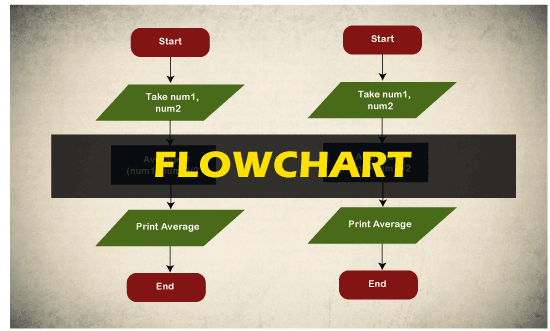
In this article, we will understand how to create flow charts in the C programming language with the help of various examples.
What do you mean by flowchart?
The Flowchart is the most widely used graphical representation of an algorithm and procedural design workflows. It uses various symbols to show the operations and decisions to be followed in a program. It flows in sequential order.
Types of Flowchart
The various types of the flowchart are given below.
- Horizontal Flowchart
- Panoramic Flowchart
- Vertical Flowchart
- Architectural Flowchart
Rules or guidelines of Flow
- Only conventional flowchart symbols should be used.
- Proper use of names and variables in the flowchart.
- If the flowchart becomes large and complex, use connector symbols.
- Flowcharts should have start and stop points.
Flowchart symbols:
The different flowchart symbols have different conventional meanings.
The various symbols used in Flowchart Designs are given below.
- Terminal Symbol: In the flowchart, it is represented with the help of a circle for denoting the start and stop symbol. The symbol given below is used to represent the terminal symbol.

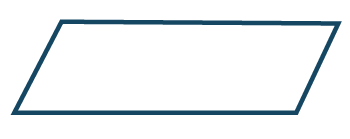
- Input/output Symbol: The input symbol is used to represent the input data, and the output symbol is used to display the output operation. The symbol given below is used for representing the Input/output symbol.
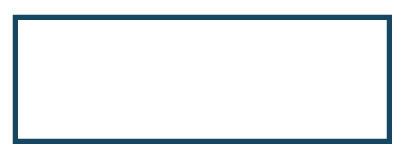
- Processing Symbol:It is represented in a flowchart with the help of a rectangle box used to represent the arithmetic and data movement instructions. The symbol given below is used to represent the processing symbol.
- Decision Symbol: Diamond symbol is used for represents decision-making statements. The symbol given below is used to represent the decision symbol.
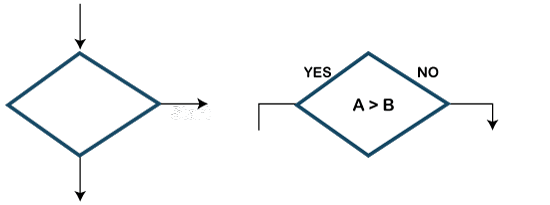
- Connector Symbol:The connector symbol is used if flows discontinued at some point and continued again at another place. The following symbol is the representation of the connector symbol.

- Flow lines: It represents the exact sequence in which instructions are executed. Arrows are used to represent the flow lines in a flowchart. The symbol given below is used for representing the flow lines:
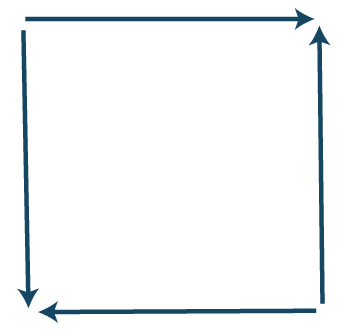
- Hexagon symbol (Flat): It is used to create a preparation box containing the loop setting statement. The symbol given below is used for representing the Hexagon symbol.

- On-Page Reference Symbol: This symbol contains a letter inside that indicates the flow continues on a matching symbol containing the same letters somewhere else on the same page. The symbol given below is used for representing the on-page reference symbol.

- Off-Page Reference: This symbol contains a letter inside indicating that the flow continues on a matching symbol containing the same letter somewhere else on a different page. The symbol given below is used to represent the off-page reference symbol.

- Delay or Bottleneck: This symbol is used for identifying a delay in a flowchart. The alternative name used for the delay is the bottleneck. The symbol given below is used to represent the delay or bottleneck symbol.

- Document Symbol: This symbol is used in a flowchart to indicate a document or report.The symbol given below is used to represent the document symbol.

- Internal storage symbol: The symbol given below is used to represent the internal storage symbol.

Advantages of Flowchart in C:
Following are the various advantages of flowchart:
- Communication: A flowchart is a better way of communicating the logic of a program.
- Synthesis: Flowchart is used as working models in designing new programs and software systems.
- Efficient Coding: Flowcharts act as a guide for a programmer in writing the actual code in a high-level language.
- Proper Debugging: Flowcharts help in the debugging process.
- Effective Analysis: Effective analysis of logical programs can be easily done with the help of a related flowchart.
- Proper Documentation: Flowchart provides better and proper documentation. It consists of various activities such as collecting, organizing, storing, and maintaining all related program records.
- Testing: A flowchart helps in the testing process.
- Efficient program maintenance: The maintenance of the program becomes easy with the help of a flowchart.
Disadvantages of Flowchart in C:
Following are the various disadvantages of flowchart:
- Time-consuming: Designing a flowchart is a very time-consuming process.
- Complex: It isn't easy to draw a flowchart for large and complex programs.
- There is no standard in the flowchart; there is no standard to determine the quantity of detail.
- Difficult to modify: It is very difficult to modify the existing flowchart.
Examples of flowchart:
The various examples of the flowchart are given below:
Example 1:
Design a flowchart for adding two numbers entered by the user.
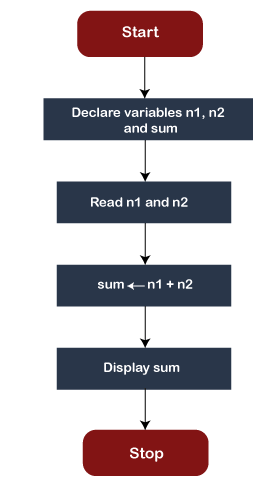
Example 2:
Design a flowchart for finding the largest among three numbers entered by the user.
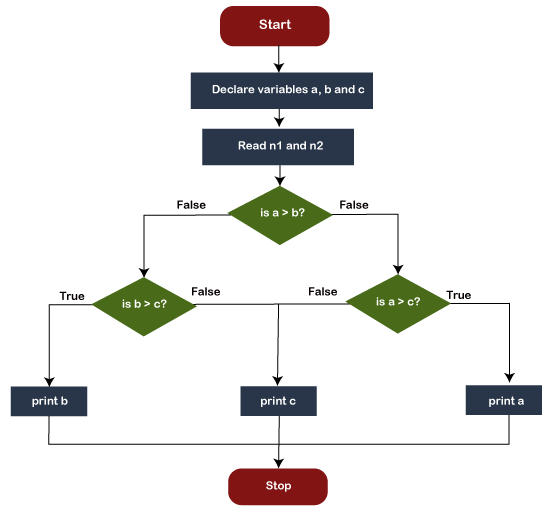
Introduction to Computer
In the modern era, computers are an essential part of our everyday existence. That means computers are present in almost every field, making our day-to-day tasks easier and faster. Nowadays, computers can be seen in banks, shops, schools, hospitals, railways, and many more places, including our home. As they are such an essential part of our lives, we must know about the basic computer introduction. Let us start with defining the computer first:
What is a Computer?
The straightforward meaning of a computer is a machine that can calculate. However, modern computers are not just a calculating device anymore. They can perform a variety of tasks. In simple terms, a computer is a programmable electronic machine used to store, retrieve, and process data.
According to the definition, "A computer is a programmable electronic device that takes data, perform instructed arithmetic and logical operations, and gives the output."
Whatever is given to the computer as input is called 'data', while the output received after processing is called 'information'.

A Brief History of Computer
The term 'Computer' was first introduced in 1640 and referred to as 'one who calculates'. It was derived from the Latin word 'computare', which meant 'to calculate'. In 1897, it was known as the 'calculating machine'. Later in 1945, the term 'computer' was introduced as 'programmable digital electronic computer, which is now called a 'computer'.
When the computers were introduced, they were large and could fill an entire room. Some computers were operated using large-sized vacuum tubes. In 1833, Charles Babbage (known as the father of the computer) invented an early calculator, which was named as the 'difference engine'. Later in 1837, he introduced the first mechanical, general-purpose computer 'Analytical Engine'. Over time, computers became powerful in performance and small in size.
Generations of Computer
There are five generations of the computer, which can be classified as below:
First Generation (1946 - 1959): During the first generation, computers were based on electronic valves (Vacuum Tubes). Some popular computers of first-generation are ENIAC, EDVAC, UNIVAC, etc.
Second Generation (1959 - 1965): During the second generation, computers were based on Transistors. Some popular computers of second-generation are IBM 1400, IBM 1620, IBM 7000 series, etc.
Third Generation (1965 - 1971): During the third generation, computers were based on Integrated Circuits (ICs). Some popular computers of the third generation are IBM 360, IBM 370, PDP, etc.
Fourth Generation (1971 - 1980): During the fourth generation, computers were based on very large scale integrated (VLSI) circuits. Some popular computers of fourth-generation are STAR 1000, CRAY-1, CRAY-X-MP, DEC 10, etc.
Fifth Generation (1980 - Present): The fifth generation is still ongoing. The computers are based on multiple technologies, such as ultra large scale integration (ULSI), artificial intelligence (AI), and parallel processing hardware. The fifth generation of computers includes Desktop, Laptop, NoteBook, etc.
Computer Software and Hardware
Software
Computer software is a group of instructions or programs that instructs the computer system to work accordingly. There are mainly two types of software:
System Software: System software help establish communication between hardware components so that the user can interact with the computer. These types of software are necessary for the computer to operate correctly. They provide an interface to run additional third party programs or utility tools. Operating systems, drivers, utility software, and firmware are typical examples of the system software.
Application Software: Application software is designed to help users to perform specific tasks, such as online surfing, setting the alarm, listening to music, playing videos, photo designing, editing, etc. This type of software mostly runs in the frontend and allows end-users to work on. Web browsers, Photoshop software, multimedia software and word processors are the example of the application software.
Hardware
The physical parts attached to a computer that form a whole computer are called hardware or hardware components. There can be different types of hardware, depending on the structure. Some most common hardware are mouse, keyboard, monitor, printer, etc. These are the parts that can be seen and touched by humans.
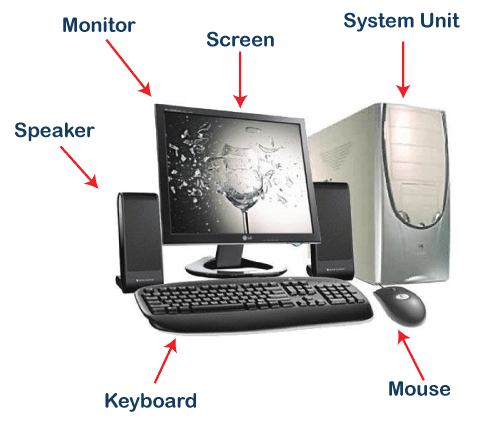
Basic Parts of Computer
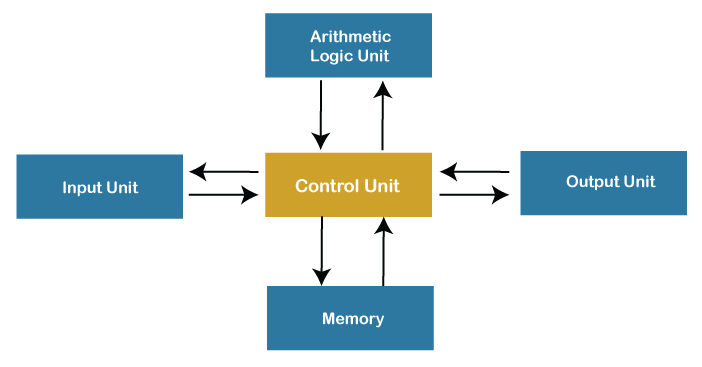
The essential components of the computer can be defined as follows:
Input Unit: Input Units or devices are used to input the data or instructions into the computers. Some most common input devices are mouse and keyword.
Output Unit: Output Units or devices are used to provide output to the user in the desired format. The most popular examples of output devices are the monitor and the printer.
Control Unit: As its name states, this unit is primarily used to control all the computer functions and functionalities. All the components or devices attached to a computer interact with each other through the control unit. In short, the control unit is referred to as 'CU'.
Arithmetic Logic Unit: The arithmetic logic unit helps perform all the computer system's arithmetic and logical operations. In short, the arithmetic logic unit is referred to as 'ALU'.
Memory: Memory is used to store all the input data, instructions, and output data. Memory usually has two types: Primary Memory and Secondary Memory. The memory found inside the CPU is called the primary memory, whereas the memory that is not the integral part of the CPU is called secondary memory.
Note: Control Unit, arithmetic logic unit, and the memory simultaneously form the central processing unit (called CPU in short).
Functions of Computer
There are four core functions of the computer, as explained below:
Input: Whatever is given to a computer is called the input. The input data is given to the computer using the input devices. The computer only takes data in a binary form (raw format). The input devices help convert the entered data in the binary form to be understandable by the computer. Data can be inputted in various forms, such as letters, numbers, images, etc.
Processing: Processing is the primary function of the computer. CPU helps to process the data according to the instructions entered into the computer system. The processing of data is an internal process of the computer system, and the data is executed in a queue. After the processing has been completed, the data is further transferred as the output. The processor (CPU) is the computer's brain, and it is a microchip. The processor's speed varies in different computers because it depends on several factors, such as the type of CPU, memory, and motherboard.
Typically, the following operations are performed on the data during the processing:
- Arithmetic Operations, such as addition, subtraction, multiplication, differentials, square root, etc.
- Logical Operations, such as equal to, not equal to, greater than, less than, opposite, etc.
Output: Anything that comes out from the computer is called the output. It is the human-readable data and displayed on the computer screen (monitor). Output can be stored in the storage devices if desired. The output devices help convert the processed data of the CPU into the human-understandable form.
Storage: The device used to store the data of a computer system is called the storage. Storage devices help to store digital data. They can store the data while the computer is operating and after processing. There are volatile and non-volatile storage options. The volatile storage can store the data as long as the power source is connected, whereas non-volatile can store the data permanently even after the power source is disconnected.
Characteristics of Computer
The essential characteristics of the computer make it such an important part of human lives. Let's understand the basic characteristics of computers:
Speed: Computers are a high-speed electronic machine. They can carry around 3-4 million instruction per second. Even advanced computers can handle trillions of instructions per second, cutting down the time to perform any digital tasks.
Accuracy: Computers are also known for their accurate performance. They can complete the given jobs at almost 100% accuracy. Although errors may occur in computers, they are usually caused by incorrect input, incorrect instructions, or bugs in chips. All of these are human errors.
Storage Capacity: Computers can easily store a massive size of data. Modern computers come inbuilt with high storage features compared to older days. Additional data can be stored on secondary devices like external hard disks, or flash memory, etc. Due to incredible speed, data can be retrieved from storage in no time.
Reliability: Computers are reliable and consistent; they can process the same tasks any number of times without throwing any error. Computers don't get tired like humans, so they are superior to perform rule-based, repetitive tasks.
Versatility: The variety of tasks that a computer can perform are almost infinite. That means computers can perform different tasks back to back without making errors; they are no longer just a computing machine. For one moment, a computer can be used to perform data entry tasks or ticket booking, and the very next moment, it can be used for complex mathematical calculations or continuous astronomical observations, etc.
Classification of Computer
According to physical size, computers are classified into the following types:
Supercomputer: Supercomputers are the fastest and the most expensive type of computer. They are large and require more space for installation. These types of computers are mainly designed to perform massive data-based and complex tasks. Supercomputers are capable enough to handle trillions of instructions at the same time.
Mainframe Computer: Mainframe computers are comparatively smaller in size as compared to supercomputers. However, they are not much small. These types of computers are designed to perform hundreds or thousands of jobs at a time simultaneously. These computers can handle heavy tasks, including complex calculations and can store vast amounts of data. They are best suited for big organizations such as banking, telecom, and educational sectors.
Microcomputer: Microcomputers are cheap in price and support multi-user platform. These are the general-purpose computers designed to handle all the necessary tasks of individual needs. Since they are comparatively slower than mainframe computers, thereby are suitable for small organizations. They are best suited for internet café, schools, universities, offices, etc. A microcomputer is also referred to as the 'Personal Computer (PC)' in general life. Laptop and desktop are examples of microcomputers.
Minicomputer: Minicomputers are also referred to as Miniframe computers. These are the midsize multiprocessing computer designed purposely for easy carry. These types of computers are light-weight and can fit in a small space. They are suitable for billing, accounting, education, and business purposes. Since these minicomputers are easy to carry, they are the best option for those who need a computer while traveling. Tablet PC, Notebooks, and cell phones are examples of minicomputers.
Workstation: Workstation is a powerful, single-user computer. A workstation is a personal computer with a faster microprocessor, a massive amount of RAM, higher-quality monitors, high graphic memory, etc. This is best suited for performing any specific type of task professionally. According to the type of tasks, a workstation can be referred to as a music workstation, graphic workstation, or engineering design workstation. Most businesses and professionals use workstations for performing tasks like animation, music creation, video editing, poster designs, data analysis and more.
Advantages of Using Computer
The following are the main advantages of using the computer:
- Computers can perform given tasks at incredible speed.
- Computers can perform the same task multiple times with the same accuracy.
- Computers allow doing several tasks simultaneously as they are best suited for multitasking.
- Computers keep the stored data secure and inaccessible from unauthorized users.
- Computers can automatically perform routine tasks with automation, making humans available for more intelligent tasks.
Disadvantages of Using Computer
The following are the main disadvantages of using the computer:
- Computers cannot work on their own. They need instructions from humans to complete tasks. Moreover, computers follow the given instructions blindly without thinking about the outcomes.
- Computers need a power supply to work. Without a power supply, they are just useless.
- Working on a computer continuously for a long period can cause several health issues.
- Wastage of computers and their parts leave a negative impact on the environment.
- Computers are taking human jobs in many sectors. They are replacing human work and thus increasing unemployment.
What is C?
C is a general-purpose programming language created by Dennis Ritchie at the Bell Laboratories in 1972.
It is a very popular language, despite being old.
C is strongly associated with UNIX, as it was developed to write the UNIX operating system.
Why Learn C?
- It is one of the most popular programming language in the world
- If you know C, you will have no problem learning other popular programming languages such as Java, Python, C++, C#, etc, as the syntax is similar
- C is very fast, compared to other programming languages, like Java and Python
- C is very versatile; it can be used in both applications and technologies
Difference between C and C++
- C++ was developed as an extension of C, and both languages have almost the same syntax
- The main difference between C and C++ is that C++ support classes and objects, while C does not
Data types in C
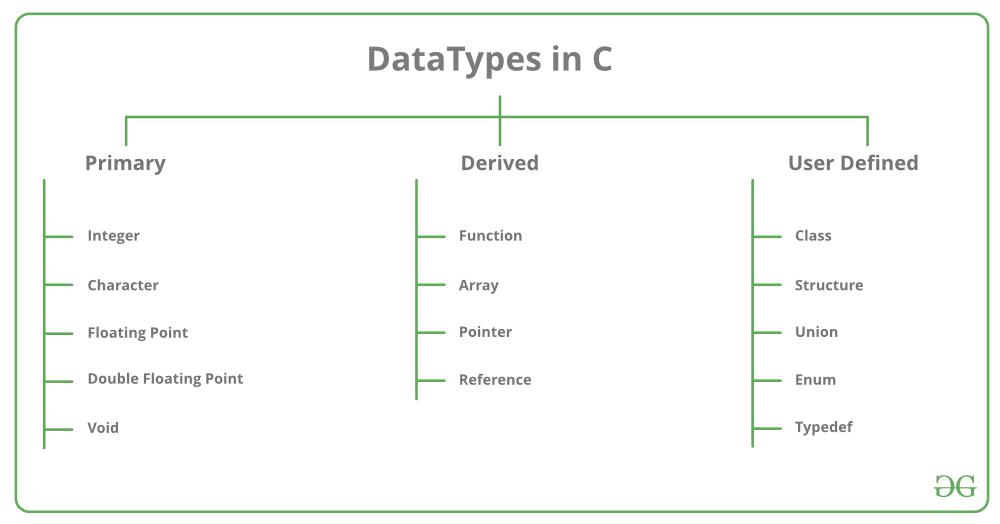
Each variable in C has an associated data type. Each data type requires different amounts of memory and has some specific operations which can be performed over it. It specifies the type of data that the variable can store like integer, character, floating, double, etc. The data type is a collection of data with values having fixed values, meaning as well as its characteristics.
The data types in C can be classified as follows:
| Types | Description |
|---|---|
| Primitive Data Types | Arithmetic types can be further classified into integer and floating data types. |
| Void Types | The data type has no value or operator and it does not provide a result to its caller. But void comes under Primitive data types. |
| User Defined DataTypes | It is mainly used to assign names to integral constants, which make a program easy to read and maintain |
| Derived types | The data types that are derived from the primitive or built-in datatypes are referred to as Derived Data Types. |
Different data types also have different ranges up to which they can store numbers. These ranges may vary from compiler to compiler. Below is a list of ranges along with the memory requirement and format specifiers on the 32-bit GCC compiler.
| Data Type | Memory (bytes) | Range | Format Specifier |
|---|---|---|---|
| short int | 2 | -32,768 to 32,767 | %hd |
| unsigned short int | 2 | 0 to 65,535 | %hu |
| unsigned int | 4 | 0 to 4,294,967,295 | %u |
| int | 4 | -2,147,483,648 to 2,147,483,647 | %d |
| long int | 4 | -2,147,483,648 to 2,147,483,647 | %ld |
| unsigned long int | 4 | 0 to 4,294,967,295 | %lu |
| long long int | 8 | -(2^63) to (2^63)-1 | %lld |
| unsigned long long int | 8 | 0 to 18,446,744,073,709,551,615 | %llu |
| signed char | 1 | -128 to 127 | %c |
| unsigned char | 1 | 0 to 255 | %c |
| float | 4 | 1.2E-38 to 3.4E+38 | %f |
| double | 8 | 1.7E-308 to 1.7E+308 | %lf |
| long double | 16 | 3.4E-4932 to 1.1E+4932 | %Lf |
Integer Types
The integer data type in C is used to store the whole numbers without decimal values. Octal values, hexadecimal values, and decimal values can be stored in int data type in C. We can determine the size of the int data type by using the sizeof operator in C. Unsigned int data type in C is used to store the data values from zero to positive numbers but it can’t store negative values like signed int. Unsigned int is larger in size than signed int and it uses “%u” as a format specifier in C programming language. Below is the programming implementation of the int data type in C.
- Range: -2,147,483,648 to 2,147,483,647
- Size: 2 bytes or 4 bytes
- Format Specifier: %d
Note: The size of an integer data type is compiler-dependent, when processors are 16-bit systems, then it shows the output of int as 2 bytes. And when processors are 32-bit then it shows 2 bytes as well as 4 bytes.
Integer value with positive data: 9
Integer value with negative data: -9
Integer value with an unsigned int data: 89
Integer value with an long int data: 99998
Character Types
Character data type allows its variable to store only a single character. The storage size of the character is 1. It is the most basic data type in C. It stores a single character and requires a single byte of memory in almost all compilers.
- Range: (-128 to 127) or (0 to 255)
- Size: 1 byte
- Format Specifier: %c
- C
Value of a: a
Value of a after increment is: b
Value of c: c
Floating-Point Types
In C programming float data type is used to store floating-point values. Float in C is used to store decimal and exponential values. It is used to store decimal numbers (numbers with floating point values) with single precision.
- Range: 1.2E-38 to 3.4E+38
- Size: 4 bytes
- Format Specifier: %f
- C
9.000000
2.500000
0.000200
Double Types
A Double data type in C is used to store decimal numbers (numbers with floating point values) with double precision. It is used to define numeric values which hold numbers with decimal values in C. Double data type is basically a precision sort of data type that is capable of holding 64 bits of decimal numbers or floating points. Since double has more precision as compared to that float then it is much more obvious that it occupies twice the memory as occupied by the floating-point type. It can easily accommodate about 16 to 17 digits after or before a decimal point.
- Range: 1.7E-308 to 1.7E+308
- Size: 8 bytes
- Format Specifier: %lf
- C
123123123.000000
12.293123
2312312312.123123
Void Data types
The void data type in C is used to specify that no value is present. It does not provide a result value to its caller. It has no values and no operations. It is used to represent nothing. Void is used in multiple ways as function return type, function arguments as void, and pointers to void.
Syntax:
// function return type void

void exit(int check);

// Function without any parameter can accept void.

int print(void);

// memory allocation function which
// returns a pointer to void.
void *malloc( size_t size);
- C
30
We can use the sizeof() operator to check the size of a variable. See the following C program for the usage of the various data types:
- C
The size of int data type : 4
The size of char data type : 1
The size of float data type : 4
The size of double data type : 8
An operator is a symbol that operates on a value or a variable. For example: + is an operator to perform addition.
C has a wide range of operators to perform various operations.
C Arithmetic Operators
An arithmetic operator performs mathematical operations such as addition, subtraction, multiplication, division etc on numerical values (constants and variables).
Operator Meaning of Operator + addition or unary plus - subtraction or unary minus * multiplication / division % remainder after division (modulo division)
Example 1: Arithmetic Operators
// Working of arithmetic operators
#include <stdio.h>
int main()
{
int a = 9,b = 4, c;
c = a+b;
printf("a+b = %d \n",c);
c = a-b;
printf("a-b = %d \n",c);
c = a*b;
printf("a*b = %d \n",c);
c = a/b;
printf("a/b = %d \n",c);
c = a%b;
printf("Remainder when a divided by b = %d \n",c);
return 0;
}
Output
a+b = 13
a-b = 5
a*b = 36
a/b = 2
Remainder when a divided by b=1
The operators +, - and * computes addition, subtraction, and multiplication respectively as you might have expected.
In normal calculation, 9/4 = 2.25. However, the output is 2 in the program.
It is because both the variables a and b are integers. Hence, the output is also an integer. The compiler neglects the term after the decimal point and shows answer 2 instead of 2.25.
The modulo operator % computes the remainder. When a=9 is divided by b=4, the remainder is 1. The % operator can only be used with integers.
Suppose a = 5.0, b = 2.0, c = 5 and d = 2. Then in C programming,
// Either one of the operands is a floating-point number
a/b = 2.5
a/d = 2.5
c/b = 2.5
// Both operands are integers
c/d = 2
C Increment and Decrement Operators
C programming has two operators increment ++ and decrement -- to change the value of an operand (constant or variable) by 1.
Increment ++ increases the value by 1 whereas decrement -- decreases the value by 1. These two operators are unary operators, meaning they only operate on a single operand.
Example 2: Increment and Decrement Operators
// Working of increment and decrement operators
#include <stdio.h>
int main()
{
int a = 10, b = 100;
float c = 10.5, d = 100.5;
printf("++a = %d \n", ++a);
printf("--b = %d \n", --b);
printf("++c = %f \n", ++c);
printf("--d = %f \n", --d);
return 0;
}
Output
++a = 11
--b = 99
++c = 11.500000
--d = 99.500000
Here, the operators ++ and -- are used as prefixes. These two operators can also be used as postfixes like a++ and a--. Visit this page to learn more about how increment and decrement operators work when used as postfix.
C Assignment Operators
An assignment operator is used for assigning a value to a variable. The most common assignment operator is =
Operator Example Same as = a = b a = b += a += b a = a+b -= a -= b a = a-b *= a *= b a = a*b /= a /= b a = a/b %= a %= b a = a%b
Example 3: Assignment Operators
// Working of assignment operators
#include <stdio.h>
int main()
{
int a = 5, c;
c = a; // c is 5
printf("c = %d\n", c);
c += a; // c is 10
printf("c = %d\n", c);
c -= a; // c is 5
printf("c = %d\n", c);
c *= a; // c is 25
printf("c = %d\n", c);
c /= a; // c is 5
printf("c = %d\n", c);
c %= a; // c = 0
printf("c = %d\n", c);
return 0;
}
Output
c = 5
c = 10
c = 5
c = 25
c = 5
c = 0
C Relational Operators
A relational operator checks the relationship between two operands. If the relation is true, it returns 1; if the relation is false, it returns value 0.
Relational operators are used in decision making and loops.
Operator Meaning of Operator Example == Equal to 5 == 3 is evaluated to 0> Greater than 5 > 3 is evaluated to 1< Less than 5 < 3 is evaluated to 0!= Not equal to 5 != 3 is evaluated to 1>= Greater than or equal to 5 >= 3 is evaluated to 1<= Less than or equal to 5 <= 3 is evaluated to 0
Example 4: Relational Operators
// Working of relational operators
#include <stdio.h>
int main()
{
int a = 5, b = 5, c = 10;
printf("%d == %d is %d \n", a, b, a == b);
printf("%d == %d is %d \n", a, c, a == c);
printf("%d > %d is %d \n", a, b, a > b);
printf("%d > %d is %d \n", a, c, a > c);
printf("%d < %d is %d \n", a, b, a < b);
printf("%d < %d is %d \n", a, c, a < c);
printf("%d != %d is %d \n", a, b, a != b);
printf("%d != %d is %d \n", a, c, a != c);
printf("%d >= %d is %d \n", a, b, a >= b);
printf("%d >= %d is %d \n", a, c, a >= c);
printf("%d <= %d is %d \n", a, b, a <= b);
printf("%d <= %d is %d \n", a, c, a <= c);
return 0;
}
Output
5 == 5 is 1
5 == 10 is 0
5 > 5 is 0
5 > 10 is 0
5 < 5 is 0
5 < 10 is 1
5 != 5 is 0
5 != 10 is 1
5 >= 5 is 1
5 >= 10 is 0
5 <= 5 is 1
5 <= 10 is 1
C Logical Operators
An expression containing logical operator returns either 0 or 1 depending upon whether expression results true or false. Logical operators are commonly used in decision making in C programming.
Operator Meaning Example && Logical AND. True only if all operands are true If c = 5 and d = 2 then, expression ((c==5) && (d>5)) equals to 0. || Logical OR. True only if either one operand is true If c = 5 and d = 2 then, expression ((c==5) || (d>5)) equals to 1. ! Logical NOT. True only if the operand is 0 If c = 5 then, expression !(c==5) equals to 0.
Example 5: Logical Operators
// Working of logical operators
#include <stdio.h>
int main()
{
int a = 5, b = 5, c = 10, result;
result = (a == b) && (c > b);
printf("(a == b) && (c > b) is %d \n", result);
result = (a == b) && (c < b);
printf("(a == b) && (c < b) is %d \n", result);
result = (a == b) || (c < b);
printf("(a == b) || (c < b) is %d \n", result);
result = (a != b) || (c < b);
printf("(a != b) || (c < b) is %d \n", result);
result = !(a != b);
printf("!(a != b) is %d \n", result);
result = !(a == b);
printf("!(a == b) is %d \n", result);
return 0;
}
Output
(a == b) && (c > b) is 1
(a == b) && (c < b) is 0
(a == b) || (c < b) is 1
(a != b) || (c < b) is 0
!(a != b) is 1
!(a == b) is 0
Explanation of logical operator program
(a == b) && (c > 5)evaluates to 1 because both operands(a == b)and(c > b)is 1 (true).(a == b) && (c < b)evaluates to 0 because operand(c < b)is 0 (false).(a == b) || (c < b)evaluates to 1 because(a = b)is 1 (true).(a != b) || (c < b)evaluates to 0 because both operand(a != b)and(c < b)are 0 (false).!(a != b)evaluates to 1 because operand(a != b)is 0 (false). Hence, !(a != b) is 1 (true).!(a == b)evaluates to 0 because(a == b)is 1 (true). Hence,!(a == b)is 0 (false).
C Bitwise Operators
During computation, mathematical operations like: addition, subtraction, multiplication, division, etc are converted to bit-level which makes processing faster and saves power.
Bitwise operators are used in C programming to perform bit-level operations.
| Operators | Meaning of operators |
|---|---|
| & | Bitwise AND |
| | | Bitwise OR |
| ^ | Bitwise exclusive OR |
| ~ | Bitwise complement |
| << | Shift left |
| >> | Shift right |
Visit bitwise operator in C to learn more.
Other Operators
Comma Operator
Comma operators are used to link related expressions together. For example:
int a, c = 5, d;The sizeof operator
The sizeof is a unary operator that returns the size of data (constants, variables, array, structure, etc).
Example 6: sizeof Operator
#include <stdio.h>
int main()
{
    int a;
    float b;
    double c;
    char d;
    printf("Size of int=%lu bytes\n",sizeof(a));
    printf("Size of float=%lu bytes\n",sizeof(b));
    printf("Size of double=%lu bytes\n",sizeof(c));
    printf("Size of char=%lu byte\n",sizeof(d));

    return 0;
}Output
Size of int = 4 bytes
Size of float = 4 bytes
Size of double = 8 bytes
Size of char = 1 byte
Other operators such as ternary operator ?:, reference operator &, dereference operator *, and member selection operator -> will be discussed in later tutorials.
Why Do We Use Control Statements in C?
In C language, the control of the program flows from a given instruction to another. This type of control flow that occurs from any given command to another is known as the sequential control flow. Now, in any C program, a programmer might want to repeat some sets of instructions or even skip the instructions when they are writing logic. Declarations in C, also known as control declarations or decision-making, help them in making such decisions.
Conditional statements are used in the C programming language for making certain decisions on the basis of the available conditions. These conditional statements get executed sequentially in case no condition is present around the statements. Whenever we put a condition for the block statements, the flow of execution may get altered on the basis of the result that is evaluated by the condition in the program. The process mentioned here is known as decision-making in the C language.
Control Statements Types Used in C Language
The C language provides support for the following set of statements in its program:
- If Statements
- Switch Statement
- Conditional Operator Statement
- Goto Statement
- Loop Statements
1. The If Statements
This type of statement would enable a programmer to choose various instruction sets on the basis of the available condition. The instruction sets will only get executed when the evaluation of the condition turns out to be true. In case the evaluation of the condition is false, there will be an execution of a different instruction set. These are also known as decision control statements. These are of the following types:
- Simple else or Null else
- Else if ladder
- Nested if
- If… else
1.1. The If… Else Statement
When we use the if… else statement, there occurs an execution of two different types of statements in a program. First, if the available condition in the program is true, then there will be an execution of the first statement. The execution of the second condition will only occur if the condition available to us is false.
The syntax for this statement is as follows:
If (condition 1)
{
Statement 1 (s1);
}
else
{
Statement 2 (s2)
}
Statement
Example:
height=int(input(“Please enter your height: “))
if height>=160:
qualified=True
else:
qualified=False
print(“Qualification status: “,qualification)
1.2. The Nested If Statement
In this case, the condition available in the next if statement (the second statement) will only get evaluated if the evaluation of the condition available in the first statement turns out to be true. This occurs throughout the program that has a nested statement.
The syntax for this statement is as follows:
If (condition 1)
{
If (condition 2)
{
Statement 1 (s1);
}
Else
{
Statement 2 (s2)
}
}
Example:
if age>0:
print(“The candidate is a baby”)
if age<4:
print(“The candidate is a toddler”)
else if age<18:
print(“The candidate is not an adult”)
else if age<50:
print(“The candidate is an adult”)
else:
print(“No input of candidate”)
1.3. The Else If Ladder
In this statement, the execution of an array of instructions occurs only when the available condition is correct. The verification of the next condition occurs when this first condition is incorrect. In case all of the specifications fail even after the verification, then there will be an execution of the default block statements. The remainder of the program’s ladder is shown below.
The syntax for this statement is as follows:
If (condition 1)
{
Statement 1 (s1);
}
Else if (condition 2)
{
Statement 2 (s2);
}
else if (condition 3)
{
Statement 3 (s3)
}
…
Else
{
Statement 4 (s4)
}
Statement (s);
Example:
if scores>=85:
result=’A+’
else if scores>=65:
result=’B+’
else if scores>=45:
result=’C+’
else:
result=”FAIL”
print(“Result: “,result)
1.4. The Simple Else or Null Else
This condition occurs when a programmer can skip or execute a set of various instructions on the basis of the condition value. We select a one-way, simple statement. When the available condition gets evaluated as true, then a set of various statements will be carried out. In case the condition is false, then the control here will proceed ahead in the program with the declaration mentioned below, after the program’s if declaration.
The syntax for this statement is as follows:
If (condition1)
{
Statement 1 (s1);
}
Statement 2 (s2);
2. The Switch Statements
The C language offers its users with a selection statement in various ways in case a program becomes difficult to read with an increased number of conditions. A switch statement is a multi-way type of selection statement that would resolve this issue. The switch declaration comes into play when more than three alternatives (conditions) exist in a program. This command then switches between all the available blocks on the basis of the expression value. Then, each block has a corresponding value with it.
The syntax for this statement is as follows:
Switch (expression_A)
{
Label case_A:
Statement A (sA);
Break;
Label case_B:
Statement B (sB);
Break;
Label case_C;
Statement C (sC);
Break;
….
Label case_Z:
Statement Z (sZ);
Break;
Default:
Statement_1 (s1);
Break;
}
Every block is shown here with the use of the case keyword. As a matter of fact, the case keyword is also followed by the block label. Note that the break statement and default block statement are very optional in the case of the switch statement.
3. The Conditional Operator Statements
The C language also comes with a very unusual operator for its programmers – the conditional operator.
The syntax of the conditional operator statements is as follows:
(condition 1)? expression_1: expression_2
Here, the execution of the expression_1 will only occur when the given condition is valid. In case this statement is incorrect, then the execution of the expression_2 will occur.
Example:
#include <stdio.h>
int main() {
int b;
int a = 2;
b = (a >= 6) ? 6 : a;/* Here, it is equivalent to: if (a >= 5) b = 5; else b = x; */
printf(“b =%d “,b);
return 0;}
The output obtained here would be:
b = 2
4. The Goto Statement
The Goto statement is especially known in the case of jumping control statements. We mainly use the goto statement when we want to transfer a program’s control from any one block to another. Also, we use the goto keyword for the declaration of the goto statement.
The syntax of the goto statement is as follows:
goto name_of_label;
name_of_label;
In the syntax given above, we have used the goto as a keyword for transferring the control of the program to the name_of_label. Here, the name_of_label refers to a variable’s name. Thus, in simpler words, the goto here will ultimately transfer the program’s control to the name_of_label. Thus, there will occur an execution of all those statements that are followed by the name_of_label.
5. The Loop Statements
A programmer in C might want to repeat any set of instructions or certain statements in the program to meet the necessary requirements. In such instances, it becomes difficult to rewrite and repeat everything. And that is exactly where we would like to create loops using the looping declarations. Loop control statements help in such types of situations in C. We have the following types of loops in C:
- Do While Loop
- While Loop
- For Loop
Practice Problems on Control Statements in C
1. What would be the output obtained out of the program mentioned below:
#include<stdio.h>
int main()
{
int var1=1;
int var2=2;
if(var1<var2)
{
printf(“The value of var1 is smaller than that of the value of var2”);
}
return 0;
}
A. The value of var2 is smaller than that of the value of var1
B. The value of var1 is smaller than that of the value of var2
C. Compile time error will be obtained as a result
D. Garbage value will be obtained as a result
Answer – B. The value of var1 is smaller than that of the value of var2
2. What would be the output obtained out of the program mentioned below?
int a = 50;
a =a+ 1;
if (a == 51) {
printf(“Congratulations on your success today!”);}
A. a= 51>50
Congratulations on your success today!
B. a= 50<51
Congratulations on your success today!
C. Congratulations on your success today!
D. Compile time error will be obtained as a result
Answer – C. Congratulations on your success today!
3. What would be the output obtained out of the program mentioned below?
#include<stdio.h>
int main()
{
int val=109;
if(val<100)
{
printf(“The available value of the variable is less than 100”);
}
else
{
printf(“The available value of the variable is greater than 100”);
}
return 0;
}
A. The available value of the variable is less than 100
B. The available value of the variable is greater than 100
C. Garbage value will be obtained as a result
D. Compile time error will be obtained as a result
Answer – A. The available value of the variable is less than 100
Frequently Asked Questions
When do we use the nested if statement?
We use a nested if statement when we want the condition available in the next if statement (the second statement) to get evaluated, only if the evaluation of the condition available in the first statement turns out to be true. This occurs throughout the program that has a nested statement.
The syntax for this statement is as follows:
If (condition 1)
{
If (condition 2)
{
Statement 1 (s1);
}
Else
{
Statement 2 (s2)
}
}
Example:
if age>0:
print(“The candidate is a baby”)
if age<4:
print(“The candidate is a toddler”)
else if age<18:
print(“The candidate is not an adult”)
else if age<50:
print(“The candidate is an adult”)
else:
print(“No input of candidate”)
Why do we need the else-if ladder when we can perform simple decision making in the C language?
When we use the else if statement, the execution of an array of instructions occurs only when the available condition is correct. The verification of the next condition occurs when this first condition is incorrect. In case all of the specifications fail even after the verification, then there will be an execution of the default block statements. The remainder of the program’s ladder is shown below.
The syntax for this statement is as follows:
If (condition 1)
{
Statement 1 (s1);
}
Else if (condition 2)
{
Statement 2 (s2);
}
else if (condition 3)
{
Statement 3 (s3)
}
…
Else
{
Statement 4 (s4)
}
Statement (s);
Example:
if scores>=85:
result=’A+’
else if scores>=65:
result=’B+’
else if scores>=45:
result=’C+’
else:
result=”FAIL”
print(“Result: “,result)
C break
The break statement ends the loop immediately when it is encountered. Its syntax is:
break;The break statement is almost always used with if...else statement inside the loop.
How break statement works?
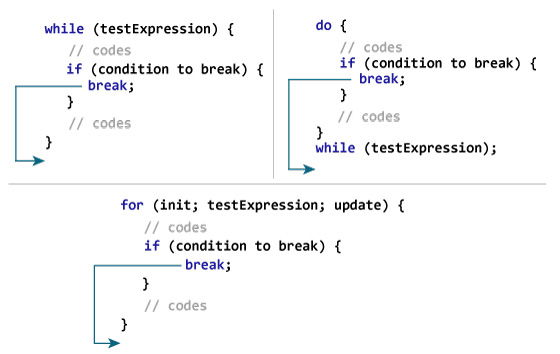
Example 1: break statement
// Program to calculate the sum of numbers (10 numbers max)
// If the user enters a negative number, the loop terminates

#include <stdio.h>

int main() {
   int i;
   double number, sum = 0.0;

   for (i = 1; i <= 10; ++i) {
      printf("Enter n%d: ", i);
      scanf("%lf", &number);

      // if the user enters a negative number, break the loop
      if (number < 0.0) {
         break;
      }

      sum += number; // sum = sum + number;
   }

   printf("Sum = %.2lf", sum);

   return 0;
}Output
Enter n1: 2.4
Enter n2: 4.5
Enter n3: 3.4
Enter n4: -3
Sum = 10.30
This program calculates the sum of a maximum of 10 numbers. Why a maximum of 10 numbers? It's because if the user enters a negative number, the break statement is executed. This will end the for loop, and the sum is displayed.
In C, break is also used with the switch statement. This will be discussed in the next tutorial.
C continue
The continue statement skips the current iteration of the loop and continues with the next iteration. Its syntax is:
continue;The continue statement is almost always used with the if...else statement.
How continue statement works?
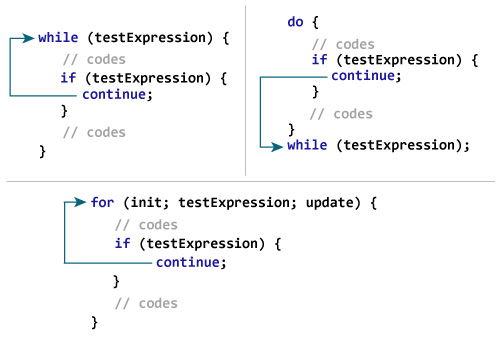
Example 2: continue statement
// Program to calculate the sum of numbers (10 numbers max)
// If the user enters a negative number, it's not added to the result

#include <stdio.h>
int main() {
   int i;
   double number, sum = 0.0;

   for (i = 1; i <= 10; ++i) {
      printf("Enter a n%d: ", i);
      scanf("%lf", &number);

      if (number < 0.0) {
         continue;
      }

      sum += number; // sum = sum + number;
   }

   printf("Sum = %.2lf", sum);

   return 0;
}Output
Enter n1: 1.1
Enter n2: 2.2
Enter n3: 5.5
Enter n4: 4.4
Enter n5: -3.4
Enter n6: -45.5
Enter n7: 34.5
Enter n8: -4.2
Enter n9: -1000
Enter n10: 12
Sum = 59.70
In this program, when the user enters a positive number, the sum is calculated using sum += number; statement.
When the user enters a negative number, the continue statement is executed and it skips the negative number from the calculation.
Call by value and Call by reference in C
There are two methods to pass the data into the function in C
language, i.e., call by value and call by reference.Let's understand call by
value and call by reference in c language one by one.
Call by
value in C
- In
call by value method, the value of the actual parameters is copied into
the formal parameters. In other words, we can say that the value of the
variable is used in the function call in the call by value method.
- In
call by value method, we can not modify the value of the actual parameter
by the formal parameter.
- In
call by value, different memory is allocated for actual and formal
parameters since the value of the actual parameter is copied into the
formal parameter.
- The
actual parameter is the argument which is used in the function call
whereas formal parameter is the argument which is used in the function
definition.
Let's try to understand the concept of call by value in c
language by the example given below:
1. #include<stdio.h>
2. void change(int num) {
3.
printf("Before adding value inside function num=%d \n",num);
4.
num=num+100;
5.
printf("After adding value inside function num=%d \n", num);
6.
}
7. int main() {
8.
int x=100;
9.
printf("Before function call x=%d \n", x);
10.
change(x);//passing value in function
11.
printf("After function call x=%d \n", x);
12. return 0;
13.
}
Output
Before function call x=100Before adding value inside function num=100After adding value inside function num=200After function call x=100
Call by Value Example: Swapping the values of the two
variables
1. #include <stdio.h>
2. void swap(int , int); //prototype of the function
3. int main()
4.
{
5.
int a = 10;
6.
int b = 20;
7.
printf("Before swapping the values in main a = %d, b = %d\n",a,b); // printing the value of a and b in main
8.
swap(a,b);
9.
printf("After swapping values in main a = %d, b = %d\n",a,b); // The value of actual parameters do not change by changing the formal parameters in call by value, a = 10, b = 20
10.
}
11. void swap (int a, int b)
12.
{
13.
int temp;
14.
temp = a;
15.
a=b;
16.
b=temp;
17.
printf("After swapping values in function a = %d, b = %d\n",a,b); // Formal parameters, a = 20, b = 10
18.
}
Output
Before swapping the values in main a = 10, b = 20After swapping values in function a = 20, b = 10After swapping values in main a = 10, b = 20
Call by
reference in C
- In
call by reference, the address of the variable is passed into the function
call as the actual parameter.
- The
value of the actual parameters can be modified by changing the formal
parameters since the address of the actual parameters is passed.
- In call by reference, the memory allocation is similar for
both formal parameters and actual parameters. All the operations in the
function are performed on the value stored at the address of the actual
parameters, and the modified value gets stored at the same address.
1.
#include<stdio.h>
2. void change(int *num) {
3.
printf("Before adding value inside function num=%d \n",*num);
4.
(*num) += 100;
5.
printf("After adding value inside function num=%d \n", *num);
6.
}
7. int main() {
8.
int x=100;
9.
printf("Before function call x=%d \n", x);
10.
change(&x);//passing reference in function
11.
printf("After function call x=%d \n", x);
12. return 0;
13.
}
Output
Before function call x=100Before adding value inside function num=100After adding value inside function num=200After function call x=200
Call by reference
Example: Swapping the values of the two variables
1. #include <stdio.h>
2. void swap(int *, int *); //prototype of the function
3. int main()
4.
{
5.
int a = 10;
6.
int b = 20;
7.
printf("Before swapping the values in main a = %d, b = %d\n",a,b); // printing the value of a and b in main
8.
swap(&a,&b);
9.
printf("After swapping values in main a = %d, b = %d\n",a,b); // The values of actual parameters do change in call by reference, a = 10, b = 20
10.
}
11. void swap (int *a, int *b)
12.
{
13.
int temp;
14.
temp = *a;
15.
*a=*b;
16.
*b=temp;
17.
printf("After swapping values in function a = %d, b = %d\n",*a,*b); // Formal parameters, a = 20, b = 10
18.
}
Output
Before swapping the values in main a = 10, b = 20After swapping values in function a = 20, b = 10After swapping values in main a = 20, b = 10
Difference
between call by value and call by reference in c
|
No. |
Call by value |
Call by reference |
|
1 |
A copy of the value is passed into the function |
An address of value is passed into the function |
|
2 |
Changes made inside the function is limited to the function
only. The values of the actual parameters do not change by changing the
formal parameters. |
Changes made inside the function validate outside of the
function also. The values of the actual parameters do change by changing the
formal parameters. |
|
3 |
Actual and formal arguments are created at the different
memory location |
Actual and formal arguments are created at the same memory
location |
A function that calls itself is
known as a recursive function. And, this technique is known as recursion.
How recursion works?
void recurse()
{
... ..
...
recurse();
... ..
...
}
int main()
{
... ..
...
recurse();
... ..
...
}
Working of Recursion
The recursion continues until some
condition is met to prevent it.
To prevent infinite recursion, if...else statement (or
similar approach) can be used where one branch makes the recursive call, and
other doesn't.
Example: Sum of
Natural Numbers Using Recursion
#include <stdio.h>
int sum(int n);
int main() {
int number, result;
printf("Enter a positive integer: ");
scanf("%d", &number);
result = sum(number);
printf("sum = %d",
result);
return 0;
}
int sum(int n) {
if (n != 0)
// sum() function calls
itself
return n + sum(n-1);
else
return n;
}
Output
Enter a positive integer:3
sum = 6
Initially, the sum() is called from the main() function with number passed
as an argument.
Suppose, the value of n inside sum() is
3 initially. During the next function call, 2 is passed to the sum() function. This process continues until n is equal to 0.
When n is equal to 0, the if condition fails and the else part is executed returning the sum of integers
ultimately to the main() function.
Sum of Natural Numbers
Advantages and
Disadvantages of Recursion
Recursion makes program elegant.
However, if performance is vital, use loops instead as recursion is usually
much slower.
That being said, recursion is an
important concept. It is frequently used in data structure and algorithms. For example, it is common to
use recursion in problems such as tree traversal.
C Array
An array is defined as the collection of similar type of data items stored at contiguous memory locations. Arrays are the derived data type in C programming language which can store the primitive type of data such as int, char, double, float, etc. It also has the capability to store the collection of derived data types, such as pointers, structure, etc. The array is the simplest data structure where each data element can be randomly accessed by using its index number.
C array is beneficial if you have to store similar elements. For example, if we want to store the marks of a student in 6 subjects, then we don't need to define different variables for the marks in the different subject. Instead of that, we can define an array which can store the marks in each subject at the contiguous memory locations.
By using the array, we can access the elements easily. Only a few lines of code are required to access the elements of the array.
Properties of Array
The array contains the following properties.
- Each element of an array is of same data type and carries the same size, i.e., int = 4 bytes.
- Elements of the array are stored at contiguous memory locations where the first element is stored at the smallest memory location.
- Elements of the array can be randomly accessed since we can calculate the address of each element of the array with the given base address and the size of the data element.
Advantage of C Array
1) Code Optimization: Less code to the access the data.
2) Ease of traversing: By using the for loop, we can retrieve the elements of an array easily.
3) Ease of sorting: To sort the elements of the array, we need a few lines of code only.
4) Random Access: We can access any element randomly using the array.
Disadvantage of C Array
1) Fixed Size: Whatever size, we define at the time of declaration of the array, we can't exceed the limit. So, it doesn't grow the size dynamically like LinkedList which we will learn later.
Declaration of C Array
We can declare an array in the c language in the following way.
Now, let us see the example to declare the array.
Here, int is the data_type, marks are the array_name, and 5 is the array_size.
Initialization of C Array
The simplest way to initialize an array is by using the index of each element. We can initialize each element of the array by using the index. Consider the following example.
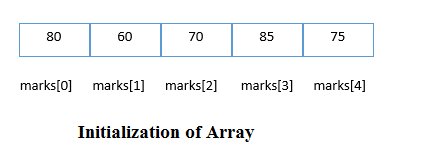
C array example
Output
80
60
70
85
75
C Array: Declaration with Initialization
We can initialize the c array at the time of declaration. Let's see the code.
In such case, there is no requirement to define the size. So it may also be written as the following code.
Let's see the C program to declare and initialize the array in C.
Output
20
30
40
50
60
C Array Example: Sorting an array
In the following program, we are using bubble sort method to sort the array in ascending order.
Two Dimensional Array in C
The two-dimensional array can be defined as an array of arrays. The 2D array is organized as matrices which can be represented as the collection of rows and columns. However, 2D arrays are created to implement a relational database lookalike data structure. It provides ease of holding the bulk of data at once which can be passed to any number of functions wherever required.
Declaration of two dimensional Array in C
The syntax to declare the 2D array is given below.
Consider the following example.
Here, 4 is the number of rows, and 3 is the number of columns.
Initialization of 2D Array in C
In the 1D array, we don't need to specify the size of the array if the declaration and initialization are being done simultaneously. However, this will not work with 2D arrays. We will have to define at least the second dimension of the array. The two-dimensional array can be declared and defined in the following way.
Two-dimensional array example in C
Output
arr[0][0] = 1
arr[0][1] = 2
arr[0][2] = 3
arr[1][0] = 2
arr[1][1] = 3
arr[1][2] = 4
arr[2][0] = 3
arr[2][1] = 4
arr[2][2] = 5
arr[3][0] = 4
arr[3][1] = 5
arr[3][2] = 6
C 2D array example: Storing elements in a matrix and printing it.
Output
Enter a[0][0]: 56
Enter a[0][1]: 10
Enter a[0][2]: 30
Enter a[1][0]: 34
Enter a[1][1]: 21
Enter a[1][2]: 34

Enter a[2][0]: 45
Enter a[2][1]: 56
Enter a[2][2]: 78

 printing the elements ....

56      10      30
34      21      34
45      56      78
Pass arrays to a function in C
In this tutorial, you'll learn to pass arrays (both one-dimensional and multidimensional arrays) to a function in C programming with the help of examples.
In C programming, you can pass an entire array to functions. Before we learn that, let's see how you can pass individual elements of an array to functions.
In this tutorial, you'll learn to pass arrays (both one-dimensional and multidimensional arrays) to a function in C programming with the help of examples.
In C programming, you can pass an entire array to functions. Before we learn that, let's see how you can pass individual elements of an array to functions.
Pass Individual Array Elements
Passing array elements to a function is similar to passing variables to a function.
Passing array elements to a function is similar to passing variables to a function.
Example 1: Pass Individual Array Elements
#include <stdio.h>
void display(int age1, int age2) {
  printf("%d\n", age1);
  printf("%d\n", age2);
}

int main() {
  int ageArray[] = {2, 8, 4, 12};

  // pass second and third elements to display()
  display(ageArray[1], ageArray[2]);
  return 0;
}
Output
8
4
Here, we have passed array parameters to the display() function in the same way we pass variables to a function.
// pass second and third elements to display()
display(ageArray[1], ageArray[2]);
We can see this in the function definition, where the function parameters are individual variables:
void display(int age1, int age2) {
  // code
}
#include <stdio.h>
void display(int age1, int age2) {
printf("%d\n", age1);
printf("%d\n", age2);
}
int main() {
int ageArray[] = {2, 8, 4, 12};
// pass second and third elements to display()
display(ageArray[1], ageArray[2]);
return 0;
}
Output
8 4
Here, we have passed array parameters to the display() function in the same way we pass variables to a function.
// pass second and third elements to display()
display(ageArray[1], ageArray[2]);We can see this in the function definition, where the function parameters are individual variables:
void display(int age1, int age2) {
// code
}Example 2: Pass Arrays to Functions
// Program to calculate the sum of array elements by passing to a function

#include <stdio.h>
float calculateSum(float num[]);

int main() {
  float result, num[] = {23.4, 55, 22.6, 3, 40.5, 18};

  // num array is passed to calculateSum()
  result = calculateSum(num);
  printf("Result = %.2f", result);
  return 0;
}

float calculateSum(float num[]) {
  float sum = 0.0;

  for (int i = 0; i < 6; ++i) {
    sum += num[i];
  }

  return sum;
}Output
Result = 162.50
To pass an entire array to a function, only the name of the array is passed as an argument.
result = calculateSum(num);
However, notice the use of [] in the function definition.
float calculateSum(float num[]) {
... ..
}
This informs the compiler that you are passing a one-dimensional array to the function.
// Program to calculate the sum of array elements by passing to a function
#include <stdio.h>
float calculateSum(float num[]);
int main() {
float result, num[] = {23.4, 55, 22.6, 3, 40.5, 18};
// num array is passed to calculateSum()
result = calculateSum(num);
printf("Result = %.2f", result);
return 0;
}
float calculateSum(float num[]) {
float sum = 0.0;
for (int i = 0; i < 6; ++i) {
sum += num[i];
}
return sum;
}Output
Result = 162.50
To pass an entire array to a function, only the name of the array is passed as an argument.
result = calculateSum(num);However, notice the use of [] in the function definition.
float calculateSum(float num[]) {
... ..
}This informs the compiler that you are passing a one-dimensional array to the function.
Pass Multidimensional Arrays to a Function
To pass multidimensional arrays to a function, only the name of the array is passed to the function (similar to one-dimensional arrays).
String in C programming is a sequence of characters terminated with a null character ‘\0’. Strings are defined as an array of characters. The difference between a character array and a string is the string is terminated with a unique character ‘\0’.
Example of C String:
To pass multidimensional arrays to a function, only the name of the array is passed to the function (similar to one-dimensional arrays).
String in C programming is a sequence of characters terminated with a null character ‘\0’. Strings are defined as an array of characters. The difference between a character array and a string is the string is terminated with a unique character ‘\0’.
Example of C String:
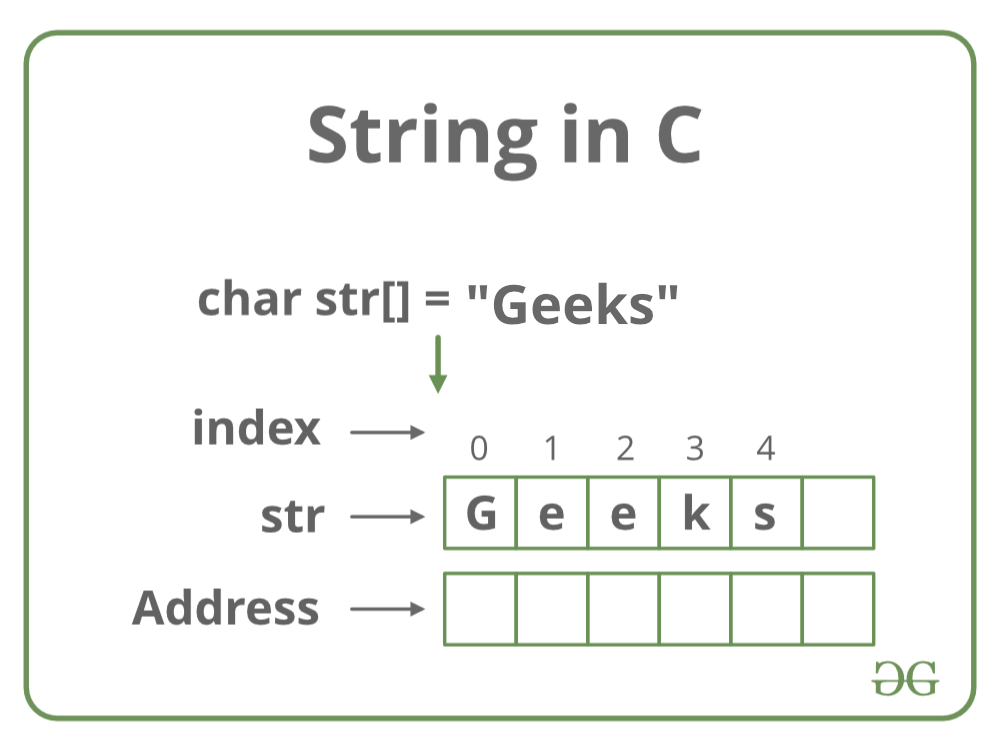
Declaration of Strings
Declaring a string is as simple as declaring a one-dimensional array. Below is the basic syntax for declaring a string.
char str_name[size];
In the above syntax str_name is any name given to the string variable and size is used to define the length of the string, i.e the number of characters strings will store.
Note: There is an extra terminating character which is the Null character (‘\0’) used to indicate the termination of a string that differs strings from normal character arrays. When a Sequence of characters enclosed in the double quotation marks is encountered by the compiler, a null character ‘\0’ is appended at the end of the string by default.
Initializing a String
Declaring a string is as simple as declaring a one-dimensional array. Below is the basic syntax for declaring a string.
char str_name[size];
In the above syntax str_name is any name given to the string variable and size is used to define the length of the string, i.e the number of characters strings will store.
Note: There is an extra terminating character which is the Null character (‘\0’) used to indicate the termination of a string that differs strings from normal character arrays. When a Sequence of characters enclosed in the double quotation marks is encountered by the compiler, a null character ‘\0’ is appended at the end of the string by default.
Initializing a String
A string can be initialized in different ways. We will explain this with the help of an example. Below are the examples to declare a string with the name str and initialize it with “GeeksforGeeks”.
A string can be initialized in different ways. We will explain this with the help of an example. Below are the examples to declare a string with the name str and initialize it with “GeeksforGeeks”.
4 Ways to Initialize a String in C
1. Assigning a string literal without size: String literals can be assigned without size. Here, the name of the string str acts as a pointer because it is an array.
char str[] = "GeeksforGeeks";
2. Assigning a string literal with a predefined size: String literals can be assigned with a predefined size. But we should always account for one extra space which will be assigned to the null character. If we want to store a string of size n then we should always declare a string with a size equal to or greater than n+1.
char str[50] = "GeeksforGeeks";
3. Assigning character by character with size: We can also assign a string character by character. But we should remember to set the end character as ‘\0’ which is a null character.
char str[14] = { 'G','e','e','k','s','f','o','r','G','e','e','k','s','\0'};4. Assigning character by character without size: We can assign character by character without size with the NULL character at the end. The size of the string is determined by the compiler automatically.
char str[] = { 'G','e','e','k','s','f','o','r','G','e','e','k','s','\0'};Below is the memory representation of the string “Geeks”.
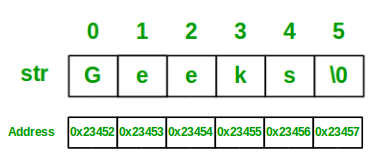
Let us now look at a sample program to get a clear understanding of declaring, initializing a string in C, and also how to print a string with its size.
- C
OutputGeeksLength of string str is 5
We can see in the above program that strings can be printed using normal printf statements just like we print any other variable. Unlike arrays, we do not need to print a string, character by character.
Note: The C language does not provide an inbuilt data type for strings but it has an access specifier “%s” which can be used to print and read strings directly.
1. Assigning a string literal without size: String literals can be assigned without size. Here, the name of the string str acts as a pointer because it is an array.
char str[] = "GeeksforGeeks";
2. Assigning a string literal with a predefined size: String literals can be assigned with a predefined size. But we should always account for one extra space which will be assigned to the null character. If we want to store a string of size n then we should always declare a string with a size equal to or greater than n+1.
char str[50] = "GeeksforGeeks";
3. Assigning character by character with size: We can also assign a string character by character. But we should remember to set the end character as ‘\0’ which is a null character.
char str[14] = { 'G','e','e','k','s','f','o','r','G','e','e','k','s','\0'};4. Assigning character by character without size: We can assign character by character without size with the NULL character at the end. The size of the string is determined by the compiler automatically.
char str[] = { 'G','e','e','k','s','f','o','r','G','e','e','k','s','\0'};Below is the memory representation of the string “Geeks”.
Let us now look at a sample program to get a clear understanding of declaring, initializing a string in C, and also how to print a string with its size.
- C
Length of string str is 5
We can see in the above program that strings can be printed using normal printf statements just like we print any other variable. Unlike arrays, we do not need to print a string, character by character.
Note: The C language does not provide an inbuilt data type for strings but it has an access specifier “%s” which can be used to print and read strings directly.
How to Read a String From User?
- C
Input:
GeeksforGeeks

Output:
GeeksforGeeks
You can see in the above program that the string can also be read using a single scanf statement. Also, you might be thinking that why we have not used the ‘&’ sign with the string name ‘str’ in scanf statement! To understand this you will have to recall your knowledge of scanf.
We know that the ‘&’ sign is used to provide the address of the variable to the scanf() function to store the value read in memory. As str[] is a character array so using str without braces ‘[‘ and ‘]’ will give the base address of this string. That’s why we have not used ‘&’ in this case as we are already providing the base address of the string to scanf.
- C
Input: GeeksforGeeks Output: GeeksforGeeks
You can see in the above program that the string can also be read using a single scanf statement. Also, you might be thinking that why we have not used the ‘&’ sign with the string name ‘str’ in scanf statement! To understand this you will have to recall your knowledge of scanf.
We know that the ‘&’ sign is used to provide the address of the variable to the scanf() function to store the value read in memory. As str[] is a character array so using str without braces ‘[‘ and ‘]’ will give the base address of this string. That’s why we have not used ‘&’ in this case as we are already providing the base address of the string to scanf.
How to Read a Line of Text in C?
We can use the fgets() function to read a line of string and gets() to read characters from the standard input (stdin) and store them as a C string until a newline character or the End-of-file (EOF) is reached.
For Example:
- C
Input:
GeeksforGeeks

Output:
String is:
GeeksforGeeks
We can use the fgets() function to read a line of string and gets() to read characters from the standard input (stdin) and store them as a C string until a newline character or the End-of-file (EOF) is reached.
For Example:
- C
Input: GeeksforGeeks Output: String is: GeeksforGeeks
Passing Strings to Function
As strings are character arrays, so we can pass strings to function in the same way we pass an array to a function. Below is a sample program to do this:
- C
Output:
String is : GeeksforGeeks
Note: We can’t read a string value with spaces, we can use either gets() or fgets() in the C programming language.
As strings are character arrays, so we can pass strings to function in the same way we pass an array to a function. Below is a sample program to do this:
- C
Output:
String is : GeeksforGeeks
Note: We can’t read a string value with spaces, we can use either gets() or fgets() in the C programming language.
Strings and Pointers
In Arrays, the variable name points to the address of the first element. Similar to Arrays in C we can create a character pointer to a string that points to the starting address of the string which is the first character of the string. The string can be accessed with the help of pointers as shown in the below example.
- C
OutputGeeksforGeeks
In Arrays, the variable name points to the address of the first element. Similar to Arrays in C we can create a character pointer to a string that points to the starting address of the string which is the first character of the string. The string can be accessed with the help of pointers as shown in the below example.
- C
GeeksforGeeks
Most Used Functions in C Strings:
Function Name Description strlen(string_name) Returns the length of string name. strcpy(s1, s2) Copies the contents of string s2 to string s1. strcmp(str1, str2) Compares the first string with the second string. If strings are the same it returns 0. strcat(s1, s2) Concat s1 string with s2 string and the result is stored in the first string. strlwr() Converts string to lowercase. strupr() Converts string to uppercase. strstr(s1, s2) Find the first occurrence of s2 in s1.
UNIT - 3
Pointers in C
A pointer is a variable that stores the memory address of another variable as its value.
A pointer variable points to a data type (like int) of the same type, and is created with the * operator.
int myAge = 43; // An int variable
int* ptr = &myAge; // A pointer variable, with the name ptr, that stores the address of myAge
// Output the value of myAge (43)
printf("%d\n", myAge);
// Output the memory address of myAge (0x7ffe5367e044)
printf("%p\n", &myAge);
// Output the memory address of myAge with the pointer (0x7ffe5367e044)
printf("%p\n", ptr);
Example explained
Create a pointer variable with the name ptr, that points to an int variable (myAge). Note that the type of the pointer has to match the type of the variable you're working with (int in our example).
Use the & operator to store the memory address of the myAge variable, and assign it to the pointer.
Now, ptr holds the value of myAge's memory address.
Notes on Pointers
Pointers are one of the things that make C stand out from other programming languages, like Python and Java.
They are important in C, because they allow us to manipulate the data in the computer's memory. This can reduce the code and improve the performance. If you are familiar with data structures like lists, trees and graphs, you should know that pointers are especially useful for implementing those. And sometimes you even have to use pointers, for example when working with file handling.
But be careful; pointers must be handled with care, since it is possible to damage data stored in other memory addresses.
Arrays
Arrays are used to store multiple values in a single variable, instead of declaring separate variables for each value.
To create an array, define the data type (like int) and specify the name of the array followed by square brackets [].
To insert values to it, use a comma-separated list, inside curly braces:
int myNumbers[] = {25, 50, 75, 100};
printf("%d", myNumbers[0]);
A 2D array can be dynamically allocated in C using a single pointer. This means that a memory block of size row*column*dataTypeSize is allocated using malloc and pointer arithmetic can be used to access the matrix elements.
A program that demonstrates this is given as follows.
Example
#include <stdio.h>
#include <stdlib.h>
int main() {
   int row = 2, col = 3;
   int *arr = (int *)malloc(row * col * sizeof(int));
   int i, j;
   for (i = 0; i < row; i++)
      for (j = 0; j < col; j++)
         *(arr + i*col + j) = i + j;
   printf("The matrix elements are:
");
   for (i = 0; i < row; i++) {
      for (j = 0; j < col; j++) {
         printf("%d ", *(arr + i*col + j));
      }
      printf("
");
   }
   free(arr);
   return 0;
}
The output of the above program is as follows.
The matrix elements are:
0 1 2
1 2 3
Now let us understand the above program.
The 2-D array arr is dynamically allocated using malloc. Then the 2-D array is initialized using a nested for loop and pointer arithmetic. The code snippet that shows this is as follows.
int row = 2, col = 3;
int *arr = (int *)malloc(row * col * sizeof(int));
int i, j;
for (i = 0; i < row; i++)
   for (j = 0; j < col; j++)
      *(arr + i*col + j) = i + j;
Then the values of the 2-D array are displayed. Finally the dynamically allocated memory is freed using free. The code snippet that shows this is as follows.
printf("The matrix elements are:
");
for (i = 0; i < row; i++) {
   for (j = 0; j < col; j++) {
      printf("%d ", *(arr + i*col + j));
   }
   printf("
");
}
free(arr);
A multi-dimensional array can be termed as an array of arrays that stores homogeneous data in tabular form. Data in multidimensional arrays are stored in row-major order.
The general form of declaring N-dimensional arrays is:
data_type array_name[size1][size2]....[sizeN];
- data_type: Type of data to be stored in the array.
- array_name: Name of the array
- size1, size2,… ,sizeN: Sizes of the dimension
Examples:
Two dimensional array: int two_d[10][20];

Three dimensional array: int three_d[10][20][30];
Size of Multidimensional Arrays:
The total number of elements that can be stored in a multidimensional array can be calculated by multiplying the size of all the dimensions.
For example:
- The array int x[10][20] can store total (10*20) = 200 elements.
- Similarly array int x[5][10][20] can store total (5*10*20) = 1000 elements.
Two-Dimensional Array
Two – dimensional array is the simplest form of a multidimensional array. We can see a two – dimensional array as an array of one-dimensional array for easier understanding.
The basic form of declaring a two-dimensional array of size x, y:
Syntax:
data_type array_name[x][y];
Here, data_type is the type of data to be stored.
We can declare a two-dimensional integer array say ‘x’ of size 10,20 as:
int x[10][20];
Elements in two-dimensional arrays are commonly referred to by x[i][j] where i is the row number and ‘j’ is the column number.
A two – dimensional array can be seen as a table with ‘x’ rows and ‘y’ columns where the row number ranges from 0 to (x-1) and the column number ranges from 0 to (y-1). A two – dimensional array ‘x’ with 3 rows and 3 columns is shown below:
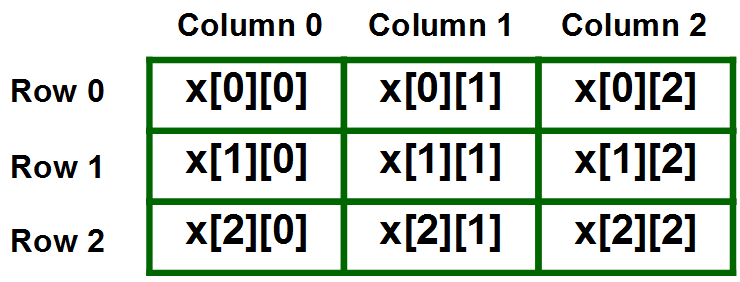
Initializing Two – Dimensional Arrays: There are various ways in which a Two-Dimensional array can be initialized.
First Method:
int x[3][4] = {0, 1 ,2 ,3 ,4 , 5 , 6 , 7 , 8 , 9 , 10 , 11}The above array has 3 rows and 4 columns. The elements in the braces from left to right are stored in the table also from left to right. The elements will be filled in the array in order, the first 4 elements from the left in the first row, the next 4 elements in the second row, and so on.
Second Method:
int x[3][4] = {{0,1,2,3}, {4,5,6,7}, {8,9,10,11}};Third Method:
int x[3][4];
for(int i = 0; i < 3; i++){
    for(int j = 0; j < 4; j++){
        cin >> x[i][j];
    }
}
Fourth Method(Dynamic Allocation):
int** x = new int*[3];
for(int i = 0; i < 3; i++){
    x[i] = new int[4];
    for(int j = 0; j < 4; j++){
        cin >> x[i][j];
    }
}
This type of initialization makes use of nested braces. Each set of inner braces represents one row. In the above example, there is a total of three rows so there are three sets of inner braces.
Accessing Elements of Two-Dimensional Arrays: Elements in Two-Dimensional arrays are accessed using the row indexes and column indexes.
Example:
int x[2][1];
The above example represents the element present in the third row and second column.
Note: In arrays, if the size of an array is N. Its index will be from 0 to N-1. Therefore, for row index 2 row number is 2+1 = 3. To output all the elements of a Two-Dimensional array we can use nested for loops. We will require two ‘for‘ loops. One to traverse the rows and another to traverse columns.
Initializing Three-Dimensional Array: Initialization in a Three-Dimensional array is the same as that of Two-dimensional arrays. The difference is as the number of dimensions increases so the number of nested braces will also increase.
Method 1:
int x[2][3][4] = {0, 1, 2, 3, 4, 5, 6, 7, 8, 9, 10,
                 11, 12, 13, 14, 15, 16, 17, 18, 19,
                 20, 21, 22, 23};
| Function Name | Description |
|---|---|
| strlen(string_name) | Returns the length of string name. |
| strcpy(s1, s2) | Copies the contents of string s2 to string s1. |
| strcmp(str1, str2) | Compares the first string with the second string. If strings are the same it returns 0. |
| strcat(s1, s2) | Concat s1 string with s2 string and the result is stored in the first string. |
| strlwr() | Converts string to lowercase. |
| strupr() | Converts string to uppercase. |
| strstr(s1, s2) | Find the first occurrence of s2 in s1. |
UNIT - 3
Pointers in C
A pointer is a variable that stores the memory address of another variable as its value.
A pointer variable points to a data type (like int) of the same type, and is created with the * operator.
int myAge = 43; // An int variable
int* ptr = &myAge; // A pointer variable, with the name ptr, that stores the address of myAge
// Output the value of myAge (43)
printf("%d\n", myAge);
// Output the memory address of myAge (0x7ffe5367e044)
printf("%p\n", &myAge);
// Output the memory address of myAge with the pointer (0x7ffe5367e044)
printf("%p\n", ptr);
Example explained
Create a pointer variable with the name ptr, that points to an int variable (myAge). Note that the type of the pointer has to match the type of the variable you're working with (int in our example).
Use the & operator to store the memory address of the myAge variable, and assign it to the pointer.
Now, ptr holds the value of myAge's memory address.
Notes on Pointers
Pointers are one of the things that make C stand out from other programming languages, like Python and Java.
They are important in C, because they allow us to manipulate the data in the computer's memory. This can reduce the code and improve the performance. If you are familiar with data structures like lists, trees and graphs, you should know that pointers are especially useful for implementing those. And sometimes you even have to use pointers, for example when working with file handling.
But be careful; pointers must be handled with care, since it is possible to damage data stored in other memory addresses.
Arrays
Arrays are used to store multiple values in a single variable, instead of declaring separate variables for each value.
To create an array, define the data type (like int) and specify the name of the array followed by square brackets [].
To insert values to it, use a comma-separated list, inside curly braces:
int myNumbers[] = {25, 50, 75, 100};
printf("%d", myNumbers[0]);
A 2D array can be dynamically allocated in C using a single pointer. This means that a memory block of size row*column*dataTypeSize is allocated using malloc and pointer arithmetic can be used to access the matrix elements.
A program that demonstrates this is given as follows.
Example
#include <stdio.h> #include <stdlib.h> int main() { int row = 2, col = 3; int *arr = (int *)malloc(row * col * sizeof(int)); int i, j; for (i = 0; i < row; i++) for (j = 0; j < col; j++) *(arr + i*col + j) = i + j; printf("The matrix elements are:
"); for (i = 0; i < row; i++) { for (j = 0; j < col; j++) { printf("%d ", *(arr + i*col + j)); } printf("
"); } free(arr); return 0; }
The output of the above program is as follows.
The matrix elements are: 0 1 2 1 2 3
Now let us understand the above program.
The 2-D array arr is dynamically allocated using malloc. Then the 2-D array is initialized using a nested for loop and pointer arithmetic. The code snippet that shows this is as follows.
int row = 2, col = 3; int *arr = (int *)malloc(row * col * sizeof(int)); int i, j; for (i = 0; i < row; i++) for (j = 0; j < col; j++) *(arr + i*col + j) = i + j;
Then the values of the 2-D array are displayed. Finally the dynamically allocated memory is freed using free. The code snippet that shows this is as follows.
printf("The matrix elements are:
"); for (i = 0; i < row; i++) { for (j = 0; j < col; j++) { printf("%d ", *(arr + i*col + j)); } printf("
"); } free(arr);
A multi-dimensional array can be termed as an array of arrays that stores homogeneous data in tabular form. Data in multidimensional arrays are stored in row-major order.
The general form of declaring N-dimensional arrays is:
data_type array_name[size1][size2]....[sizeN];
- data_type: Type of data to be stored in the array.
- array_name: Name of the array
- size1, size2,… ,sizeN: Sizes of the dimension
Examples:
Two dimensional array: int two_d[10][20]; Three dimensional array: int three_d[10][20][30];
Size of Multidimensional Arrays:
The total number of elements that can be stored in a multidimensional array can be calculated by multiplying the size of all the dimensions.
For example:
- The array int x[10][20] can store total (10*20) = 200 elements.
- Similarly array int x[5][10][20] can store total (5*10*20) = 1000 elements.
Two-Dimensional Array
Two – dimensional array is the simplest form of a multidimensional array. We can see a two – dimensional array as an array of one-dimensional array for easier understanding.
The basic form of declaring a two-dimensional array of size x, y:
Syntax:
data_type array_name[x][y];
Here, data_type is the type of data to be stored.
We can declare a two-dimensional integer array say ‘x’ of size 10,20 as:
int x[10][20];
Elements in two-dimensional arrays are commonly referred to by x[i][j] where i is the row number and ‘j’ is the column number.
A two – dimensional array can be seen as a table with ‘x’ rows and ‘y’ columns where the row number ranges from 0 to (x-1) and the column number ranges from 0 to (y-1). A two – dimensional array ‘x’ with 3 rows and 3 columns is shown below:
Initializing Two – Dimensional Arrays: There are various ways in which a Two-Dimensional array can be initialized.
First Method:
int x[3][4] = {0, 1 ,2 ,3 ,4 , 5 , 6 , 7 , 8 , 9 , 10 , 11}The above array has 3 rows and 4 columns. The elements in the braces from left to right are stored in the table also from left to right. The elements will be filled in the array in order, the first 4 elements from the left in the first row, the next 4 elements in the second row, and so on.
Second Method:
int x[3][4] = {{0,1,2,3}, {4,5,6,7}, {8,9,10,11}};Third Method:
int x[3][4];
for(int i = 0; i < 3; i++){
for(int j = 0; j < 4; j++){
cin >> x[i][j];
}
}Fourth Method(Dynamic Allocation):
int** x = new int*[3];
for(int i = 0; i < 3; i++){
x[i] = new int[4];
for(int j = 0; j < 4; j++){
cin >> x[i][j];
}
}This type of initialization makes use of nested braces. Each set of inner braces represents one row. In the above example, there is a total of three rows so there are three sets of inner braces.
Accessing Elements of Two-Dimensional Arrays: Elements in Two-Dimensional arrays are accessed using the row indexes and column indexes.
Example:
int x[2][1];
The above example represents the element present in the third row and second column.
Note: In arrays, if the size of an array is N. Its index will be from 0 to N-1. Therefore, for row index 2 row number is 2+1 = 3. To output all the elements of a Two-Dimensional array we can use nested for loops. We will require two ‘for‘ loops. One to traverse the rows and another to traverse columns.
Initializing Three-Dimensional Array: Initialization in a Three-Dimensional array is the same as that of Two-dimensional arrays. The difference is as the number of dimensions increases so the number of nested braces will also increase.
Method 1:
int x[2][3][4] = {0, 1, 2, 3, 4, 5, 6, 7, 8, 9, 10,
11, 12, 13, 14, 15, 16, 17, 18, 19,
20, 21, 22, 23};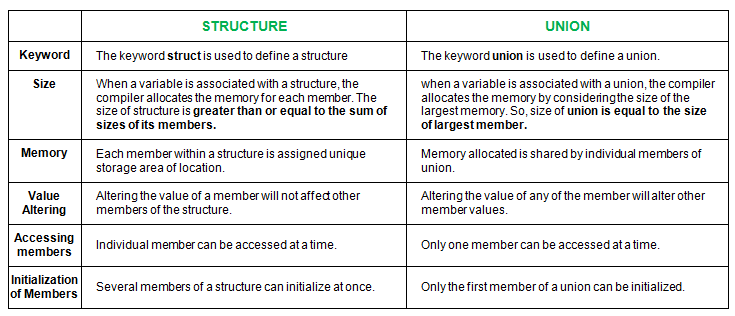
UNIT-4
File Handling in C
In programming, we may require some specific input data to be generated several numbers of times. Sometimes, it is not enough to only display the data on the console. The data to be displayed may be very large, and only a limited amount of data can be displayed on the console, and since the memory is volatile, it is impossible to recover the programmatically generated data again and again. However, if we need to do so, we may store it onto the local file system which is volatile and can be accessed every time. Here, comes the need of file handling in C.
File handling in C enables us to create, update, read, and delete the files stored on the local file system through our C program. The following operations can be performed on a file.
- Creation of the new file
- Opening an existing file
- Reading from the file
- Writing to the file
- Deleting the file
Types of Files
When dealing with files, there are two types of files you should know about:
- Text files
- Binary files
1. Text files
Text files are the normal .txt files. You can easily create text files using any simple text editors such as Notepad.
When you open those files, you'll see all the contents within the file as plain text. You can easily edit or delete the contents.
They take minimum effort to maintain, are easily readable, and provide the least security and takes bigger storage space.
2. Binary files
Binary files are mostly the .bin files in your computer.
Instead of storing data in plain text, they store it in the binary form (0's and 1's).
They can hold a higher amount of data, are not readable easily, and provides better security than text files.
Functions for file handling
There are many functions in the C library to open, read, write, search and close the file. A list of file functions are given below:
| No. | Function | Description |
|---|---|---|
| 1 | fopen() | opens new or existing file |
| 2 | fprintf() | write data into the file |
| 3 | fscanf() | reads data from the file |
| 4 | fputc() | writes a character into the file |
| 5 | fgetc() | reads a character from file |
| 6 | fclose() | closes the file |
| 7 | fseek() | sets the file pointer to given position |
| 8 | fputw() | writes an integer to file |
| 9 | fgetw() | reads an integer from file |
| 10 | ftell() | returns current position |
| 11 | rewind() | sets the file pointer to the beginning of the file |
Opening File: fopen()
We must open a file before it can be read, write, or update. The fopen() function is used to open a file. The syntax of the fopen() is given below.
The fopen() function accepts two parameters:
- The file name (string). If the file is stored at some specific location, then we must mention the path at which the file is stored. For example, a file name can be like "c://some_folder/some_file.ext".
- The mode in which the file is to be opened. It is a string.
We can use one of the following modes in the fopen() function.
| Mode | Description |
|---|---|
| r | opens a text file in read mode |
| w | opens a text file in write mode |
| a | opens a text file in append mode |
| r+ | opens a text file in read and write mode |
| w+ | opens a text file in read and write mode |
| a+ | opens a text file in read and write mode |
| rb | opens a binary file in read mode |
| wb | opens a binary file in write mode |
| ab | opens a binary file in append mode |
| rb+ | opens a binary file in read and write mode |
| wb+ | opens a binary file in read and write mode |
| ab+ | opens a binary file in read and write mode |
The fopen function works in the following way.
- Firstly, It searches the file to be opened.
- Then, it loads the file from the disk and place it into the buffer. The buffer is used to provide efficiency for the read operations.
- It sets up a character pointer which points to the first character of the file.
Consider the following example which opens a file in write mode.
Output
The content of the file will be printed.
#include;
void main( )
{
FILE *fp; // file pointer
char ch;
fp = fopen("file_handle.c","r");
while ( 1 )
{
ch = fgetc ( fp ); //Each character of the file is read and stored in the character file.
if ( ch == EOF )
break;
printf("%c",ch);
}
fclose (fp );
}
Closing File: fclose()
The fclose() function is used to close a file. The file must be closed after performing all the operations on it. The syntax of fclose() function is given below:
Example
The following example shows the usage of fclose() function.
#include <stdio.h>

int main () {
   FILE *fp;

   fp = fopen("file.txt", "w");

   fprintf(fp, "%s", "This is tutorialspoint.com");
   fclose(fp);

   return(0);
}
Let us compile and run the above program that will create a file file.txt, and then it will write following text line and finally it will close the file using fclose() function.
Formatted and Unformatted Input/Output functions in C
- Formatted I/O Functions.
- Unformatted I/O Functions.
- Formatted I/O Functions vs Unformatted I/O Functions.
Formatted I/O Functions
Formatted I/O functions are used to take various inputs from the user and display multiple outputs to the user. These types of I/O functions can help to display the output to the user in different formats using the format specifiers. These I/O supports all data types like int, float, char, and many more.
These functions are called formatted I/O functions because we can use format specifiers in these functions and hence, we can format these functions according to our needs.
List of some format specifiers-
| S NO. | Format Specifier | Type | Description |
| 1 | %d | int/signed int | used for I/O signed integer value |
| 2 | %c | char | Used for I/O character value |
| 3 | %f | float | Used for I/O decimal floating-point value |
| 4 | %s | string | Used for I/O string/group of characters |
| 5 | %ld | long int | Used for I/O long signed integer value |
| 6 | %u | unsigned int | Used for I/O unsigned integer value |
| 7 | %i | unsigned int | used for the I/O integer value |
| 8 | %lf | double | Used for I/O fractional or floating data |
| 9 | %n | prints | prints nothing |
The following formatted I/O functions will be discussed in this section-
- printf()
- scanf()
- sprintf()
- sscanf()
printf():
printf() function is used in a C program to display any value like float, integer, character, string, etc on the console screen. It is a pre-defined function that is already declared in the stdio.h(header file).
Syntax 1:
To display any variable value.
printf(“Format Specifier”, var1, var2, …., varn);
Output20
Input:
$ g++ mainreturn.cpp -o main
$ ./main geeks for geeks
Output:
You have entered 4 arguments:
./main
geeks
for
geeks A macro is a piece of code in a program that is replaced by the value of the macro. Macro is defined by #define directive. Whenever a macro name is encountered by the compiler, it replaces the name with the definition of the macro. Macro definitions need not be terminated by a semi-colon(;).
Below are the programs to illustrate the use of macros in C/C++:Program 1:
- C
- C++
OutputThe value of LIMIT is 5Enumeration (or enum) in C
Enumeration (or enum) is a user defined data type in C. It is mainly used to assign names to integral constants, the names make a program easy to read and maintain.
Hereby mistake, the state of wed is 2, it should be 3. Please refer to the same example below for a better understanding.
enum State {Working = 1, Failed = 0};The keyword ‘enum’ is used to declare new enumeration types in C and C++. Following is an example of enum declaration.
// The name of enumeration is "flag" and the constant // are the values of the flag. By default, the values // of the constants are as follows: // constant1 = 0, constant2 = 1, constant3 = 2 and // so on. enum flag{constant1, constant2, constant3, ....... };Variables of type enum can also be defined. They can be defined in two ways:
// In both of the below cases, "day" is // defined as the variable of type week. enum week{Mon, Tue, Wed}; enum week day; // Or enum week{Mon, Tue, Wed}day;
- C
Output:
2In the above example, we declared “day” as the variable and the value of “Wed” is allocated to day, which is 2. So as a result, 2 is printed.
BIT FIELDS in C
In C, we can specify the size (in bits) of the structure and union members. The idea of bit-field is to use memory efficiently when we know that the value of a field or group of fields will never exceed a limit or is within a small range. Bit fields are used when the storage of our program is limited. Need of bit fields in C programming language:
- Reduces memory consumption.
- To make our program more efficient and flexible.
- Easy to Implement.
Applications of Bit-fields:
- If storage is limited, we can go for bit-field.
- When devices transmit status or information encoded into multiple bits for this type of situation bit-field is most efficient.
- Encryption routines need to access the bits within a byte in that situation bit-field is quite useful.
For example, consider the following declaration of date without the use of bit fields.
Thank You...
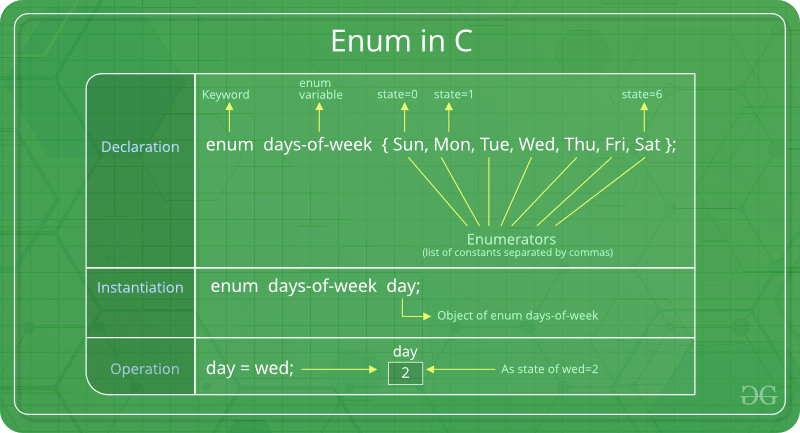
No comments:
Post a Comment